> ## Documentation Index
> Fetch the complete documentation index at: https://docs-dev-feat-docs-5569-member-mgmt.mintlify.site/llms.txt
> Use this file to discover all available pages before exploring further.

> Learn how to configure an update policy form using Forms for Actions for users to review and accept new terms of service or consent updates.

# Use Cases: Configure an update policy form using Forms

<Card title="Before you start">
  1. Create a [Machine-to-Machine Application](/docs/get-started/auth0-overview/create-applications/machine-to-machine-apps) with the following scopes enabled:

  * `read:users`
  * `update:users`
  * `create:users`
  * `read:users_app_metadata`
  * `update:users_app_metadata`
  * `create:users_app_metadata`

  2. Add a [Vault connection](/docs/customize/forms/vault) using the M2M application credentials.
</Card>

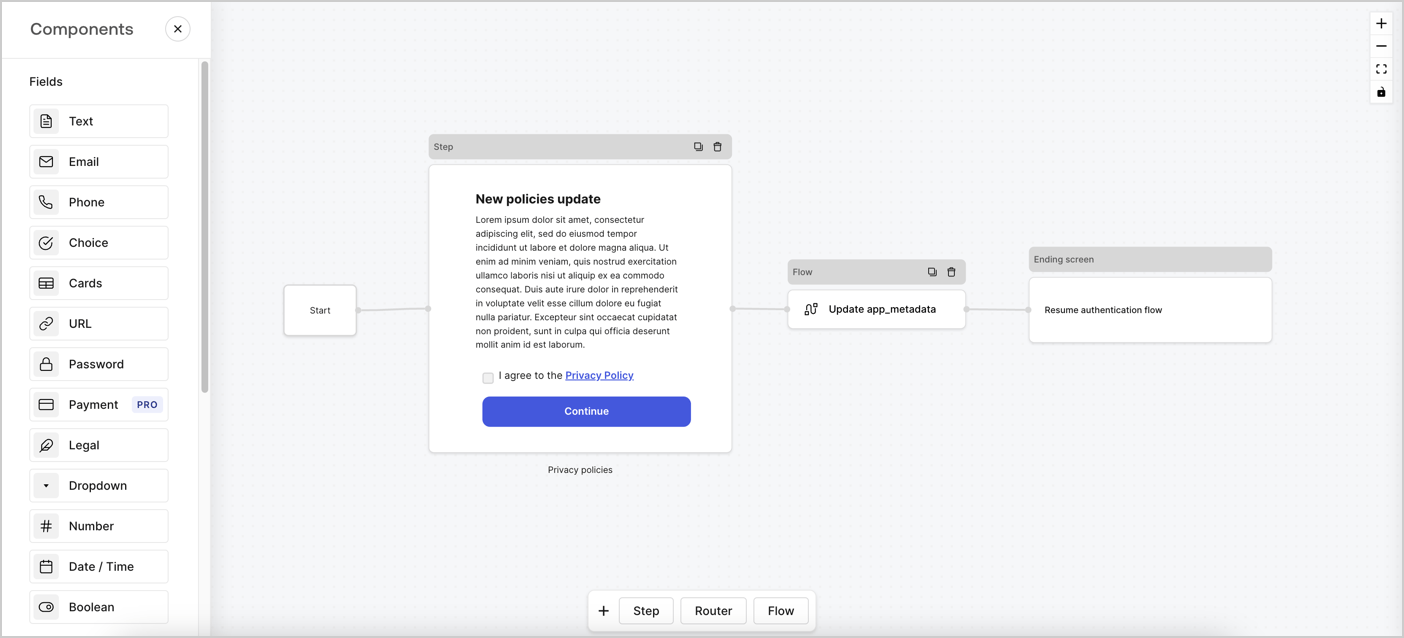
Forms for Actions allows you to create custom privacy policies flows and store the consent under the `app_metadata` object.
<Frame>
  <img src="https://mintcdn.com/docs-dev-feat-docs-5569-member-mgmt/GHbAzUX93WXGjKrY/docs/images/cdy7uua7fh8z/6i68dMvHDTijfRmSgN1x8Q/ad900e7d4c0fb34645921435472b8684/privavy-policy-form.png?fit=max&auto=format&n=GHbAzUX93WXGjKrY&q=85&s=ab3405e5bb2b86fdccf27ffd49a532a8" alt="Dashboard > Actions > Forms > Privacy policy use case" data-og-width="1404" width="1404" data-og-height="638" height="638" data-path="docs/images/cdy7uua7fh8z/6i68dMvHDTijfRmSgN1x8Q/ad900e7d4c0fb34645921435472b8684/privavy-policy-form.png" data-optimize="true" data-opv="3" srcset="https://mintcdn.com/docs-dev-feat-docs-5569-member-mgmt/GHbAzUX93WXGjKrY/docs/images/cdy7uua7fh8z/6i68dMvHDTijfRmSgN1x8Q/ad900e7d4c0fb34645921435472b8684/privavy-policy-form.png?w=280&fit=max&auto=format&n=GHbAzUX93WXGjKrY&q=85&s=f7c74e4c093b611fbb87b71fb6951eaa 280w, https://mintcdn.com/docs-dev-feat-docs-5569-member-mgmt/GHbAzUX93WXGjKrY/docs/images/cdy7uua7fh8z/6i68dMvHDTijfRmSgN1x8Q/ad900e7d4c0fb34645921435472b8684/privavy-policy-form.png?w=560&fit=max&auto=format&n=GHbAzUX93WXGjKrY&q=85&s=7e2d3ad188c322f85a01c854bbc0b7ea 560w, https://mintcdn.com/docs-dev-feat-docs-5569-member-mgmt/GHbAzUX93WXGjKrY/docs/images/cdy7uua7fh8z/6i68dMvHDTijfRmSgN1x8Q/ad900e7d4c0fb34645921435472b8684/privavy-policy-form.png?w=840&fit=max&auto=format&n=GHbAzUX93WXGjKrY&q=85&s=c412b74216f62ea8123898fb9cd5b0da 840w, https://mintcdn.com/docs-dev-feat-docs-5569-member-mgmt/GHbAzUX93WXGjKrY/docs/images/cdy7uua7fh8z/6i68dMvHDTijfRmSgN1x8Q/ad900e7d4c0fb34645921435472b8684/privavy-policy-form.png?w=1100&fit=max&auto=format&n=GHbAzUX93WXGjKrY&q=85&s=2474a7cd6f0776c265a52a19aed9bf63 1100w, https://mintcdn.com/docs-dev-feat-docs-5569-member-mgmt/GHbAzUX93WXGjKrY/docs/images/cdy7uua7fh8z/6i68dMvHDTijfRmSgN1x8Q/ad900e7d4c0fb34645921435472b8684/privavy-policy-form.png?w=1650&fit=max&auto=format&n=GHbAzUX93WXGjKrY&q=85&s=eb63a8ab411f8593ace1de0b055a10c8 1650w, https://mintcdn.com/docs-dev-feat-docs-5569-member-mgmt/GHbAzUX93WXGjKrY/docs/images/cdy7uua7fh8z/6i68dMvHDTijfRmSgN1x8Q/ad900e7d4c0fb34645921435472b8684/privavy-policy-form.png?w=2500&fit=max&auto=format&n=GHbAzUX93WXGjKrY&q=85&s=0992634d5d383b883809b479446ba751 2500w" />
</Frame>

The sections below outline how you can create an Update Policy form using nodes and flows, along with steps for adding your form to a [Post Login](/docs/customize/actions/explore-triggers/signup-and-login-triggers/login-trigger) Action.

## Create a form from scratch

Follow these steps to create a form to gather information:

1. Open the Form editor by selecting **Auth0 Dashboard > Actions > Forms.**
2. Select **Create Form** > **Start from scratch**.

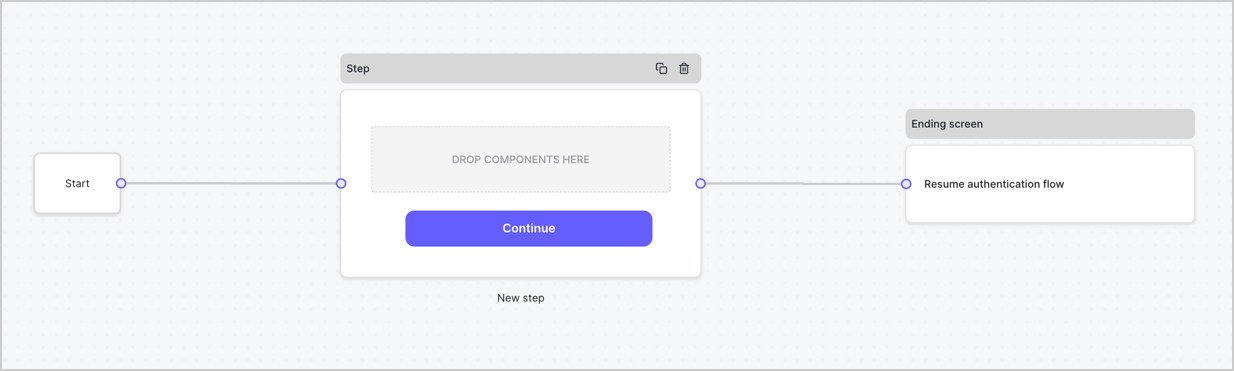
By default, a new form contains a Start node, a Step node, and an Ending screen node.
<Frame>
  <img src="https://mintcdn.com/docs-dev-feat-docs-5569-member-mgmt/dKijRnrX2BPHFL7x/docs/images/cdy7uua7fh8z/2TZ9jSjgEcARFpULI6hz4R/a4319a1bd482f2ee5cc23100fdb2f42c/New-form-Forms-for-action-use-case.png?fit=max&auto=format&n=dKijRnrX2BPHFL7x&q=85&s=1a50f1ebdf591a4d0e8c50c41ad84033" alt="Dashboard > Forms > Use Cases > Form" data-og-width="1234" width="1234" data-og-height="371" height="371" data-path="docs/images/cdy7uua7fh8z/2TZ9jSjgEcARFpULI6hz4R/a4319a1bd482f2ee5cc23100fdb2f42c/New-form-Forms-for-action-use-case.png" data-optimize="true" data-opv="3" srcset="https://mintcdn.com/docs-dev-feat-docs-5569-member-mgmt/dKijRnrX2BPHFL7x/docs/images/cdy7uua7fh8z/2TZ9jSjgEcARFpULI6hz4R/a4319a1bd482f2ee5cc23100fdb2f42c/New-form-Forms-for-action-use-case.png?w=280&fit=max&auto=format&n=dKijRnrX2BPHFL7x&q=85&s=596eeea3d1fbc5a22bdac77be064d50c 280w, https://mintcdn.com/docs-dev-feat-docs-5569-member-mgmt/dKijRnrX2BPHFL7x/docs/images/cdy7uua7fh8z/2TZ9jSjgEcARFpULI6hz4R/a4319a1bd482f2ee5cc23100fdb2f42c/New-form-Forms-for-action-use-case.png?w=560&fit=max&auto=format&n=dKijRnrX2BPHFL7x&q=85&s=d37a7e789c950b5b8f8586dfc47efbda 560w, https://mintcdn.com/docs-dev-feat-docs-5569-member-mgmt/dKijRnrX2BPHFL7x/docs/images/cdy7uua7fh8z/2TZ9jSjgEcARFpULI6hz4R/a4319a1bd482f2ee5cc23100fdb2f42c/New-form-Forms-for-action-use-case.png?w=840&fit=max&auto=format&n=dKijRnrX2BPHFL7x&q=85&s=c1d1e64e7076545725d4050b750bf04e 840w, https://mintcdn.com/docs-dev-feat-docs-5569-member-mgmt/dKijRnrX2BPHFL7x/docs/images/cdy7uua7fh8z/2TZ9jSjgEcARFpULI6hz4R/a4319a1bd482f2ee5cc23100fdb2f42c/New-form-Forms-for-action-use-case.png?w=1100&fit=max&auto=format&n=dKijRnrX2BPHFL7x&q=85&s=9e44cd4ebc58a7b74e611b11040ef4fb 1100w, https://mintcdn.com/docs-dev-feat-docs-5569-member-mgmt/dKijRnrX2BPHFL7x/docs/images/cdy7uua7fh8z/2TZ9jSjgEcARFpULI6hz4R/a4319a1bd482f2ee5cc23100fdb2f42c/New-form-Forms-for-action-use-case.png?w=1650&fit=max&auto=format&n=dKijRnrX2BPHFL7x&q=85&s=0dd5e486df7a5635ab06a54f3e81570f 1650w, https://mintcdn.com/docs-dev-feat-docs-5569-member-mgmt/dKijRnrX2BPHFL7x/docs/images/cdy7uua7fh8z/2TZ9jSjgEcARFpULI6hz4R/a4319a1bd482f2ee5cc23100fdb2f42c/New-form-Forms-for-action-use-case.png?w=2500&fit=max&auto=format&n=dKijRnrX2BPHFL7x&q=85&s=0c461faaa0af762154b6df42b4d53d6c 2500w" />
</Frame>

### Configure the Step node

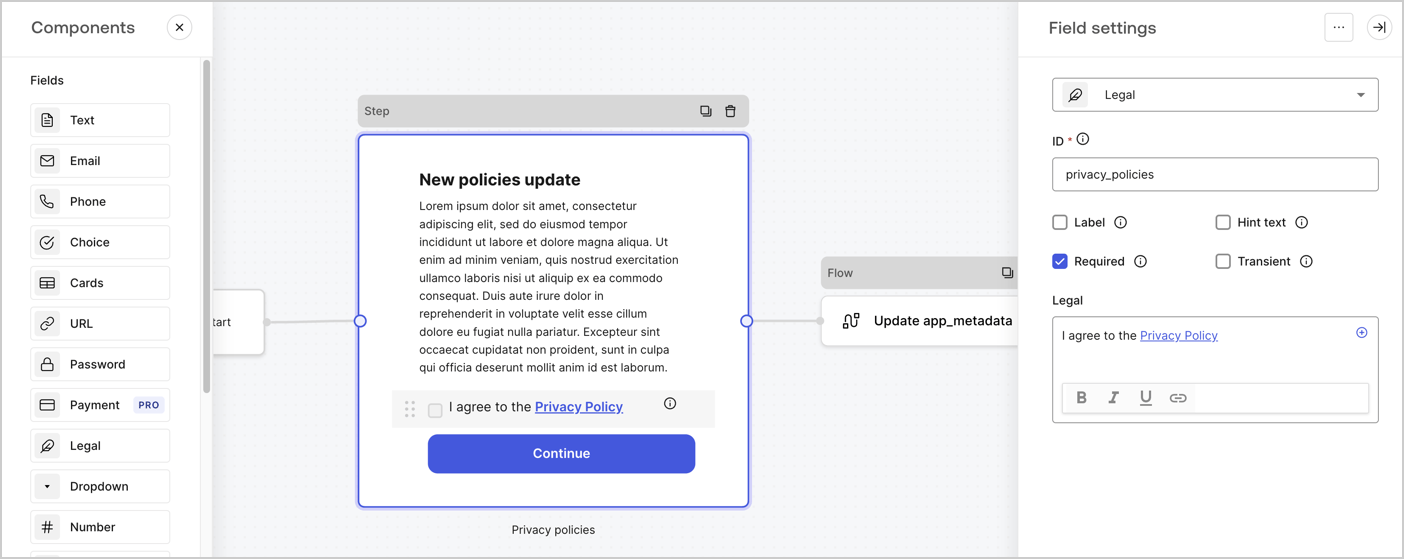
The Step node is the graphical interface visible to users. Add [Fields](/docs/customize/forms/nodes-and-components) to the Step node to collect the new agreement acceptance value by following these steps:

1. Drag a **Rich text** field from the **Components menu** into the **Step** node.

   * **Rich text**: Enter a description of your privacy policies updates.
   * Select **Save**.
2. Drag a **Legal** field into the **Step** node.

   * **ID**: Enter `privacy_policies`.
   * **Required**: Enable the checkbox.
   * **Legal**: Enter `I agree to the Privacy Policy`.
   * Select **Save**.
3. Select **Publish** to save.
<Frame>
  <img src="https://mintcdn.com/docs-dev-feat-docs-5569-member-mgmt/hobIPhRT1h6P57fg/docs/images/cdy7uua7fh8z/59zFFjQjAnjogkc2QGIqqJ/0ad66b1b636544122aa4e65968b76c2c/privacy-policy-step-node.png?fit=max&auto=format&n=hobIPhRT1h6P57fg&q=85&s=84ff6a4668359b8e221580fbc630b0b0" alt="Dashboard > Actions > Forms > Use case privacy policy step node" data-og-width="1404" width="1404" data-og-height="559" height="559" data-path="docs/images/cdy7uua7fh8z/59zFFjQjAnjogkc2QGIqqJ/0ad66b1b636544122aa4e65968b76c2c/privacy-policy-step-node.png" data-optimize="true" data-opv="3" srcset="https://mintcdn.com/docs-dev-feat-docs-5569-member-mgmt/hobIPhRT1h6P57fg/docs/images/cdy7uua7fh8z/59zFFjQjAnjogkc2QGIqqJ/0ad66b1b636544122aa4e65968b76c2c/privacy-policy-step-node.png?w=280&fit=max&auto=format&n=hobIPhRT1h6P57fg&q=85&s=bc43c5cb6f68e9d37a332b142ee98284 280w, https://mintcdn.com/docs-dev-feat-docs-5569-member-mgmt/hobIPhRT1h6P57fg/docs/images/cdy7uua7fh8z/59zFFjQjAnjogkc2QGIqqJ/0ad66b1b636544122aa4e65968b76c2c/privacy-policy-step-node.png?w=560&fit=max&auto=format&n=hobIPhRT1h6P57fg&q=85&s=5029aa573622272309742d4844121a83 560w, https://mintcdn.com/docs-dev-feat-docs-5569-member-mgmt/hobIPhRT1h6P57fg/docs/images/cdy7uua7fh8z/59zFFjQjAnjogkc2QGIqqJ/0ad66b1b636544122aa4e65968b76c2c/privacy-policy-step-node.png?w=840&fit=max&auto=format&n=hobIPhRT1h6P57fg&q=85&s=ff55beb60f415c5be087faae99e5d491 840w, https://mintcdn.com/docs-dev-feat-docs-5569-member-mgmt/hobIPhRT1h6P57fg/docs/images/cdy7uua7fh8z/59zFFjQjAnjogkc2QGIqqJ/0ad66b1b636544122aa4e65968b76c2c/privacy-policy-step-node.png?w=1100&fit=max&auto=format&n=hobIPhRT1h6P57fg&q=85&s=f498204c0338831b6d20a627395d246b 1100w, https://mintcdn.com/docs-dev-feat-docs-5569-member-mgmt/hobIPhRT1h6P57fg/docs/images/cdy7uua7fh8z/59zFFjQjAnjogkc2QGIqqJ/0ad66b1b636544122aa4e65968b76c2c/privacy-policy-step-node.png?w=1650&fit=max&auto=format&n=hobIPhRT1h6P57fg&q=85&s=223b6ff5959b3216cdc773519c448f0a 1650w, https://mintcdn.com/docs-dev-feat-docs-5569-member-mgmt/hobIPhRT1h6P57fg/docs/images/cdy7uua7fh8z/59zFFjQjAnjogkc2QGIqqJ/0ad66b1b636544122aa4e65968b76c2c/privacy-policy-step-node.png?w=2500&fit=max&auto=format&n=hobIPhRT1h6P57fg&q=85&s=14254a07a5b111b631392651a5ce159e 2500w" />
</Frame>

### Configure the Flow node

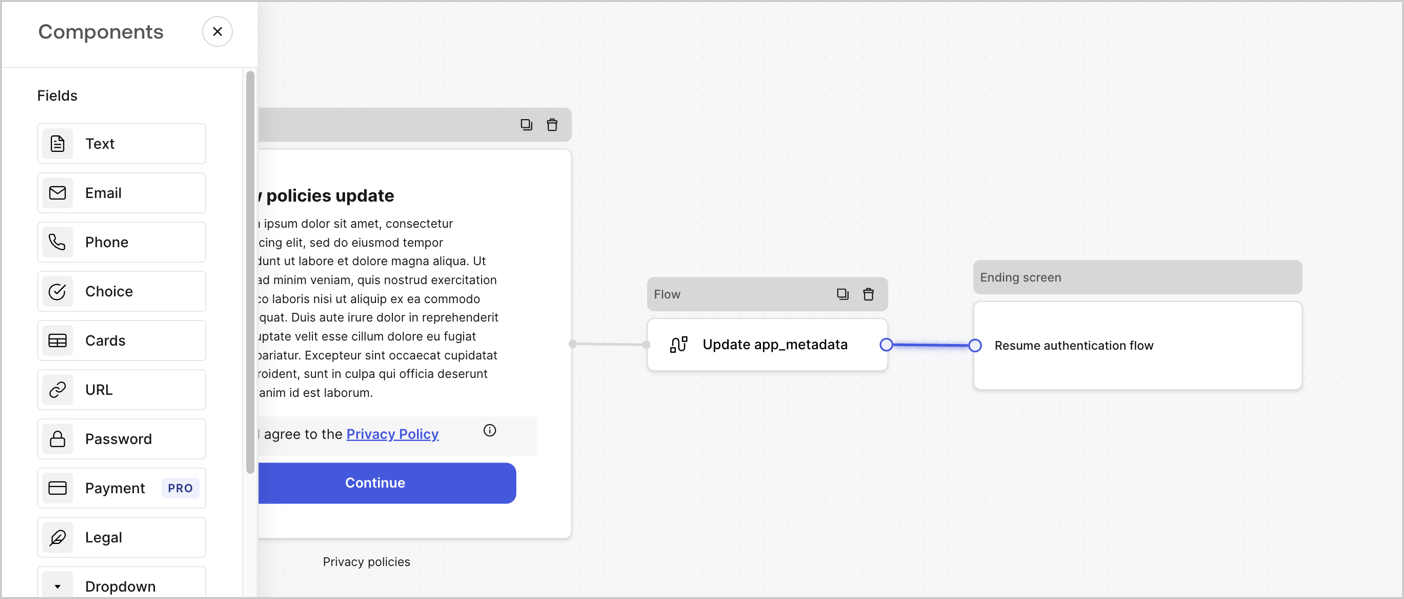
Add a **Flow** node after the **Step** node to update the `app_metadata` and resume the authentication flow by following these steps:

1. Select **Flow** from the bottom of the Form editor.
2. Remove the existing link between the **Step** and **Ending Screen** nodes.
3. Select the new **Flow** > **Click to add a flow** > **Create a new flow.**

   * Enter `Update app_metadata` in the **Name** field.
   * Select **Create**.
   * Select **Save**.
4. Link the **Flow** node to the **Step** and **Ending Screen** nodes as pictured below.
5. Select **Publish** to save.
<Frame>
  <img src="https://mintcdn.com/docs-dev-feat-docs-5569-member-mgmt/GHbAzUX93WXGjKrY/docs/images/cdy7uua7fh8z/6YIkzm7SrpM9LW76AXuRzh/353c518fe82bbaa440836da1d83596d6/link-policies.png?fit=max&auto=format&n=GHbAzUX93WXGjKrY&q=85&s=25895968ec86650a18fc580ee2b7f2d8" alt="Dashboard > Actions > Forms > Form" data-og-width="1404" width="1404" data-og-height="599" height="599" data-path="docs/images/cdy7uua7fh8z/6YIkzm7SrpM9LW76AXuRzh/353c518fe82bbaa440836da1d83596d6/link-policies.png" data-optimize="true" data-opv="3" srcset="https://mintcdn.com/docs-dev-feat-docs-5569-member-mgmt/GHbAzUX93WXGjKrY/docs/images/cdy7uua7fh8z/6YIkzm7SrpM9LW76AXuRzh/353c518fe82bbaa440836da1d83596d6/link-policies.png?w=280&fit=max&auto=format&n=GHbAzUX93WXGjKrY&q=85&s=4d86f8c1759a5be106eeed59e7a1bd0e 280w, https://mintcdn.com/docs-dev-feat-docs-5569-member-mgmt/GHbAzUX93WXGjKrY/docs/images/cdy7uua7fh8z/6YIkzm7SrpM9LW76AXuRzh/353c518fe82bbaa440836da1d83596d6/link-policies.png?w=560&fit=max&auto=format&n=GHbAzUX93WXGjKrY&q=85&s=6d3f4c3144d55591dfae6809ecd15413 560w, https://mintcdn.com/docs-dev-feat-docs-5569-member-mgmt/GHbAzUX93WXGjKrY/docs/images/cdy7uua7fh8z/6YIkzm7SrpM9LW76AXuRzh/353c518fe82bbaa440836da1d83596d6/link-policies.png?w=840&fit=max&auto=format&n=GHbAzUX93WXGjKrY&q=85&s=4147fd844e516fad0f1cd2c95f209301 840w, https://mintcdn.com/docs-dev-feat-docs-5569-member-mgmt/GHbAzUX93WXGjKrY/docs/images/cdy7uua7fh8z/6YIkzm7SrpM9LW76AXuRzh/353c518fe82bbaa440836da1d83596d6/link-policies.png?w=1100&fit=max&auto=format&n=GHbAzUX93WXGjKrY&q=85&s=b7d3673a855b2e62df30a889c328d511 1100w, https://mintcdn.com/docs-dev-feat-docs-5569-member-mgmt/GHbAzUX93WXGjKrY/docs/images/cdy7uua7fh8z/6YIkzm7SrpM9LW76AXuRzh/353c518fe82bbaa440836da1d83596d6/link-policies.png?w=1650&fit=max&auto=format&n=GHbAzUX93WXGjKrY&q=85&s=dc9a47388fe4005cac3942dd557a5026 1650w, https://mintcdn.com/docs-dev-feat-docs-5569-member-mgmt/GHbAzUX93WXGjKrY/docs/images/cdy7uua7fh8z/6YIkzm7SrpM9LW76AXuRzh/353c518fe82bbaa440836da1d83596d6/link-policies.png?w=2500&fit=max&auto=format&n=GHbAzUX93WXGjKrY&q=85&s=40848ff8d92ace61300de22722655ecb 2500w" />
</Frame>

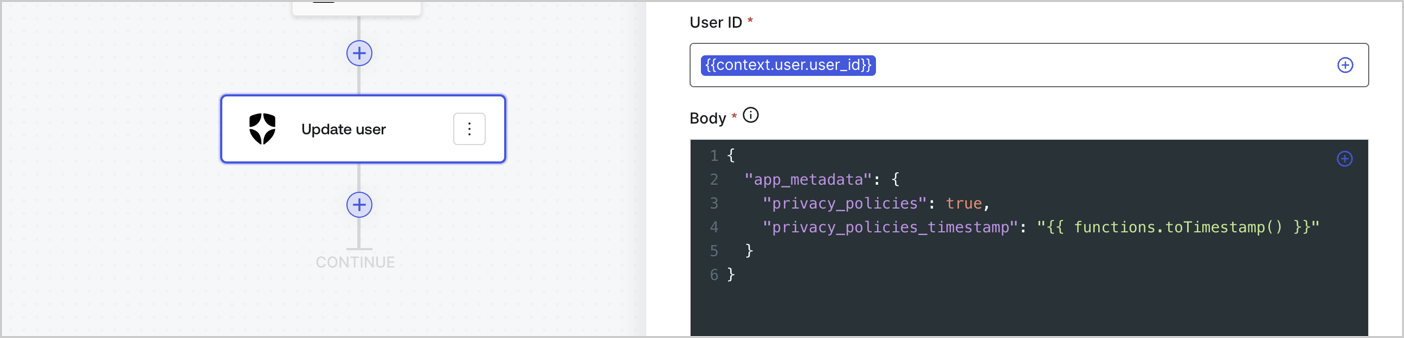
Add an Auth0 Update user action to the flow by following these steps:

1. Select the **Flow** **Update app\_metadata** > **Edit flow** to open the Flow editor in a new tab.
2. Below the StartAction, select the **+** icon to add an **Update user** action. Complete the fields below, then select **Save** to continue.

   * **Connection**: Select from the dropdown the Vault connection to your M2M application.

   * **User ID**: Enter `{{context.user.user_id}}`.

   * **Body**: Copy and paste the following code to update the app\_metadata with the privacy\_policies and privacy\_policies\_timestamp properties.

     ```text lines theme={null}
     {
       "app_metadata": {
         "privacy_policies": true,
         "privacy_policies_timestamp": "{{ functions.toTimestamp() }}"
       }
     }
     ```

   * Select **Save**.
3. Select **Publish** to save.
<Frame>
  <img src="https://mintcdn.com/docs-dev-feat-docs-5569-member-mgmt/PFX1_z3zyGIRz99m/docs/images/cdy7uua7fh8z/CvMNIwWrOUwaFW4X3G28p/1fb70ae57a20749d9ffaaba8dc0b7e26/update-user-privacy.png?fit=max&auto=format&n=PFX1_z3zyGIRz99m&q=85&s=a762d45346e8f086c52fe258c97deae5" alt="Dashboard > Actions > Forms > User case privacy policy code" data-og-width="1404" width="1404" data-og-height="338" height="338" data-path="docs/images/cdy7uua7fh8z/CvMNIwWrOUwaFW4X3G28p/1fb70ae57a20749d9ffaaba8dc0b7e26/update-user-privacy.png" data-optimize="true" data-opv="3" srcset="https://mintcdn.com/docs-dev-feat-docs-5569-member-mgmt/PFX1_z3zyGIRz99m/docs/images/cdy7uua7fh8z/CvMNIwWrOUwaFW4X3G28p/1fb70ae57a20749d9ffaaba8dc0b7e26/update-user-privacy.png?w=280&fit=max&auto=format&n=PFX1_z3zyGIRz99m&q=85&s=a2f718d242b3b53145a3f5818f3db0fc 280w, https://mintcdn.com/docs-dev-feat-docs-5569-member-mgmt/PFX1_z3zyGIRz99m/docs/images/cdy7uua7fh8z/CvMNIwWrOUwaFW4X3G28p/1fb70ae57a20749d9ffaaba8dc0b7e26/update-user-privacy.png?w=560&fit=max&auto=format&n=PFX1_z3zyGIRz99m&q=85&s=9244ea24cd30c428784c101dbd8b8b0a 560w, https://mintcdn.com/docs-dev-feat-docs-5569-member-mgmt/PFX1_z3zyGIRz99m/docs/images/cdy7uua7fh8z/CvMNIwWrOUwaFW4X3G28p/1fb70ae57a20749d9ffaaba8dc0b7e26/update-user-privacy.png?w=840&fit=max&auto=format&n=PFX1_z3zyGIRz99m&q=85&s=9b8d0bf1e144b99fff89807312298303 840w, https://mintcdn.com/docs-dev-feat-docs-5569-member-mgmt/PFX1_z3zyGIRz99m/docs/images/cdy7uua7fh8z/CvMNIwWrOUwaFW4X3G28p/1fb70ae57a20749d9ffaaba8dc0b7e26/update-user-privacy.png?w=1100&fit=max&auto=format&n=PFX1_z3zyGIRz99m&q=85&s=b8c6994242cac7a3b831dd7c0fa56fbd 1100w, https://mintcdn.com/docs-dev-feat-docs-5569-member-mgmt/PFX1_z3zyGIRz99m/docs/images/cdy7uua7fh8z/CvMNIwWrOUwaFW4X3G28p/1fb70ae57a20749d9ffaaba8dc0b7e26/update-user-privacy.png?w=1650&fit=max&auto=format&n=PFX1_z3zyGIRz99m&q=85&s=46776a690e750a27963bda5e4ae8bfc8 1650w, https://mintcdn.com/docs-dev-feat-docs-5569-member-mgmt/PFX1_z3zyGIRz99m/docs/images/cdy7uua7fh8z/CvMNIwWrOUwaFW4X3G28p/1fb70ae57a20749d9ffaaba8dc0b7e26/update-user-privacy.png?w=2500&fit=max&auto=format&n=PFX1_z3zyGIRz99m&q=85&s=b40ca0698d48886c7be82c6d1a2d7b17 2500w" />
</Frame>

<Callout icon="file-lines" color="#0EA5E9" iconType="regular">
  The flow **Update app\_metadata** adds a `privacy_policies true` value to the app`_metadata` object and also generates a timestamp with a [helper function.](/docs/customize/forms/variables)
</Callout>

## Retrieve the form render code

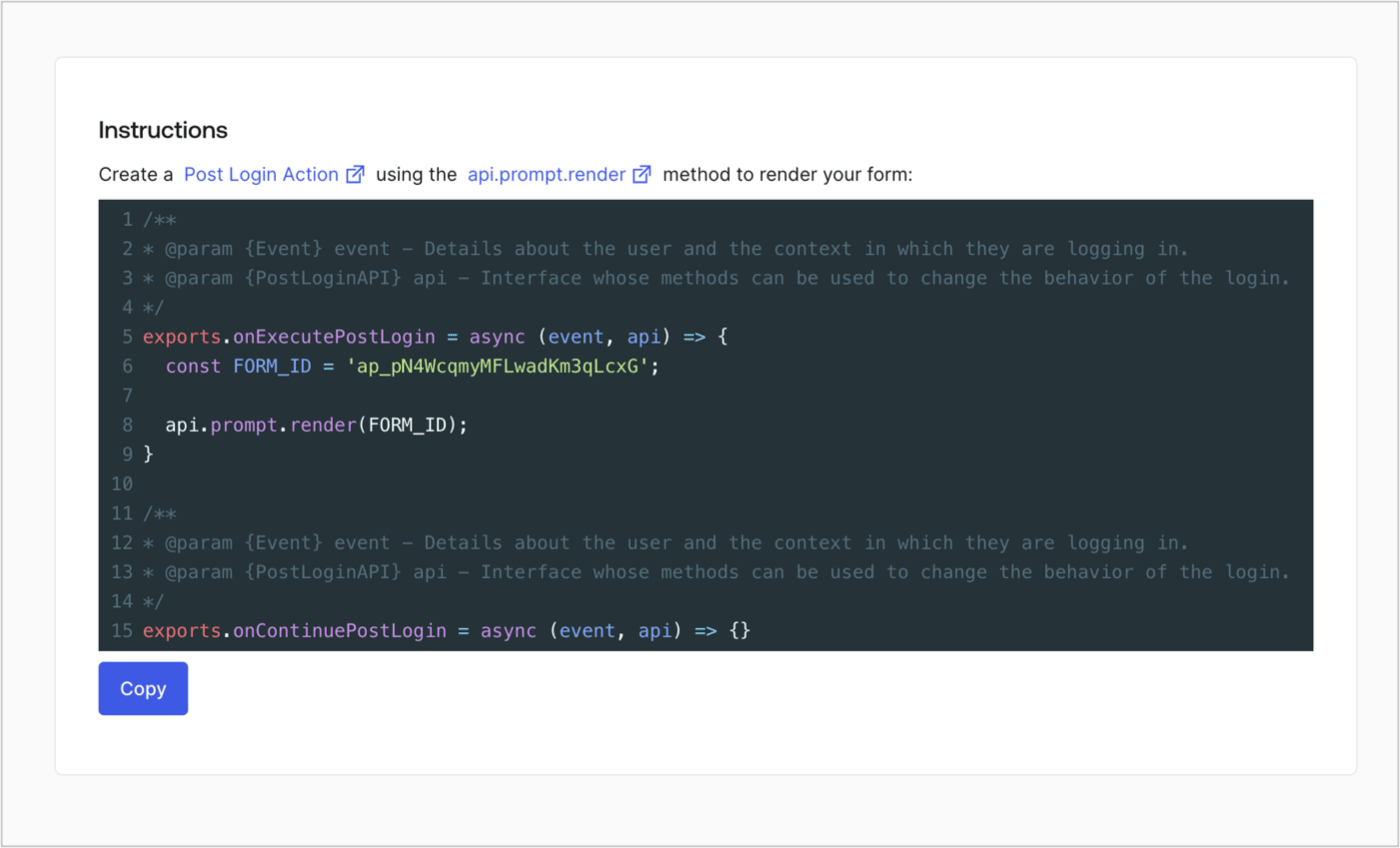
Retrieve your form render code to visually render the form with a custom Post Login Action by following these steps:

* From the Form editor, select **`<> Render`**.
* Select **Copy**.
<Frame>
  <img src="https://mintcdn.com/docs-dev-feat-docs-5569-member-mgmt/sNckq9vrTPN8JAyP/docs/images/cdy7uua7fh8z/2EIUzc539sq9lwoTKbjoJv/496a864c0fc44a782c9cadca119dbfb0/embed.png?fit=max&auto=format&n=sNckq9vrTPN8JAyP&q=85&s=9ca8bc6257248ef9cf464a95ba080f03" alt="Dashboard > Actions > Forms > Form > Embed" data-og-width="1400" width="1400" data-og-height="848" height="848" data-path="docs/images/cdy7uua7fh8z/2EIUzc539sq9lwoTKbjoJv/496a864c0fc44a782c9cadca119dbfb0/embed.png" data-optimize="true" data-opv="3" srcset="https://mintcdn.com/docs-dev-feat-docs-5569-member-mgmt/sNckq9vrTPN8JAyP/docs/images/cdy7uua7fh8z/2EIUzc539sq9lwoTKbjoJv/496a864c0fc44a782c9cadca119dbfb0/embed.png?w=280&fit=max&auto=format&n=sNckq9vrTPN8JAyP&q=85&s=bd453c87ae087bebbd08819a703d33e2 280w, https://mintcdn.com/docs-dev-feat-docs-5569-member-mgmt/sNckq9vrTPN8JAyP/docs/images/cdy7uua7fh8z/2EIUzc539sq9lwoTKbjoJv/496a864c0fc44a782c9cadca119dbfb0/embed.png?w=560&fit=max&auto=format&n=sNckq9vrTPN8JAyP&q=85&s=870a75c55387d36bd9f2ec775f90201a 560w, https://mintcdn.com/docs-dev-feat-docs-5569-member-mgmt/sNckq9vrTPN8JAyP/docs/images/cdy7uua7fh8z/2EIUzc539sq9lwoTKbjoJv/496a864c0fc44a782c9cadca119dbfb0/embed.png?w=840&fit=max&auto=format&n=sNckq9vrTPN8JAyP&q=85&s=a93304eebdb0c57f0e713fc91394a08f 840w, https://mintcdn.com/docs-dev-feat-docs-5569-member-mgmt/sNckq9vrTPN8JAyP/docs/images/cdy7uua7fh8z/2EIUzc539sq9lwoTKbjoJv/496a864c0fc44a782c9cadca119dbfb0/embed.png?w=1100&fit=max&auto=format&n=sNckq9vrTPN8JAyP&q=85&s=a89397c8eb54cdffabbed023584bdcf3 1100w, https://mintcdn.com/docs-dev-feat-docs-5569-member-mgmt/sNckq9vrTPN8JAyP/docs/images/cdy7uua7fh8z/2EIUzc539sq9lwoTKbjoJv/496a864c0fc44a782c9cadca119dbfb0/embed.png?w=1650&fit=max&auto=format&n=sNckq9vrTPN8JAyP&q=85&s=d44772daacbe37a2db1772136778bdaf 1650w, https://mintcdn.com/docs-dev-feat-docs-5569-member-mgmt/sNckq9vrTPN8JAyP/docs/images/cdy7uua7fh8z/2EIUzc539sq9lwoTKbjoJv/496a864c0fc44a782c9cadca119dbfb0/embed.png?w=2500&fit=max&auto=format&n=sNckq9vrTPN8JAyP&q=85&s=9d2151612563de2dd8456d88a2821a61 2500w" />
</Frame>

## Create a Post Login Action

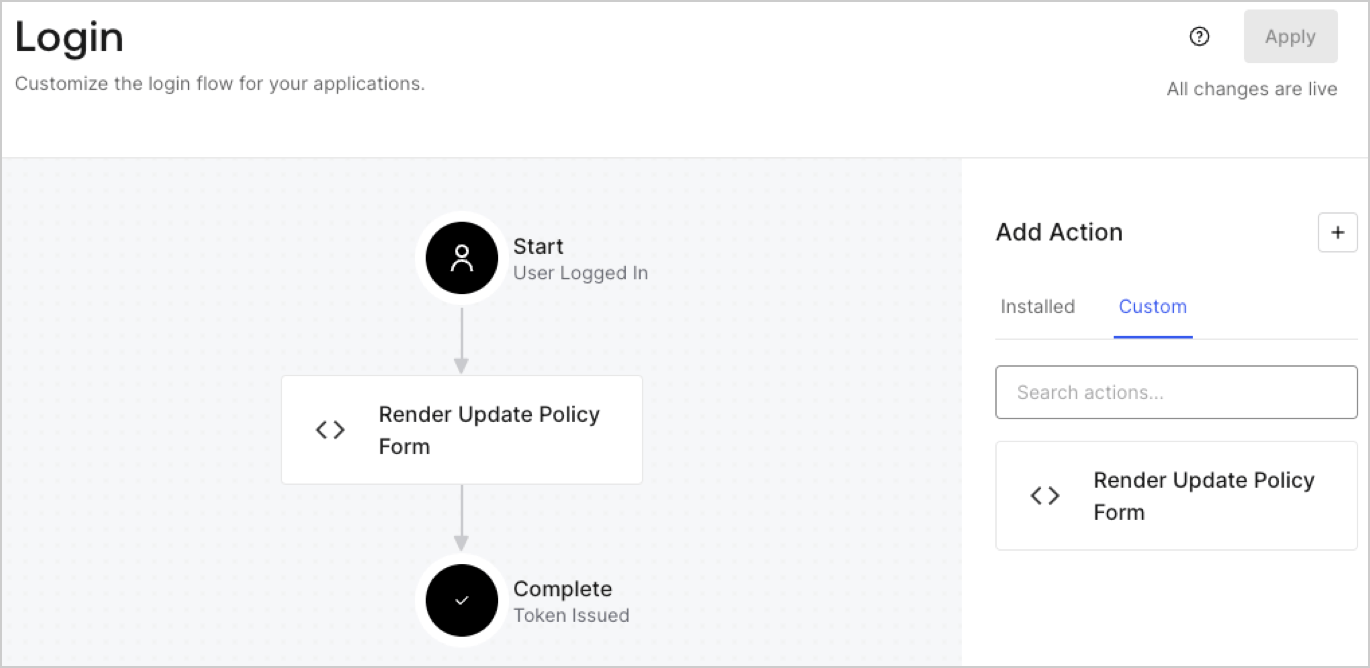
Create a post-login Action to render your form by following these steps:

1. Navigate to **Auth0 Dashboard > Actions > Flows > Login.**
2. Select the **+** icon and Select **Build from scratch**:

   * **Name**: Enter `Render Update Policy Form`.
   * **Trigger**: Select `Login / Post Login`.
   * **Runtime**: Select the recommended version.
3. Select **Create**.

To configure the post-login Action:

1. Delete the existing code from the Code editor.
2. Paste the form render code into the Code editor.
3. Edit the code to define the conditional logic that will render the form.

   ```javascript lines theme={null}
   /**
   * @param {Event} event - Details about the user and the context in which they are logging in.
   * @param {PostLoginAPI} api - Interface whose methods can be used to change the behavior of the login.
   */
   exports.onExecutePostLogin = async (event, api) => {
     const FORM_ID = 'REPLACE_WITH_YOUR_FORM_ID';

     if (event.user.app_metadata.privacy_policies !== true) {
       api.prompt.render(FORM_ID);
     }
   }

   exports.onContinuePostLogin = async (event, api) => { }
   ```

   <Callout icon="file-lines" color="#0EA5E9" iconType="regular">
     The example code above will render the form when a user is missing the app metadata `privacy_policies` property.
   </Callout>
4. Select **Deploy.**
5. Drag and Drop the **Render Update Policy Form** Action to the **Login** flow.
   <Frame>
     <img src="https://mintcdn.com/docs-dev-feat-docs-5569-member-mgmt/BnIaLNnckKOAli37/docs/images/cdy7uua7fh8z/5TOwDgevZsBqd7yZynUYWU/41ca909dc3007aed4f40ff794a05efa5/postlogin.png?fit=max&auto=format&n=BnIaLNnckKOAli37&q=85&s=f612ee67813cef98a8c1b35b2733a9c3" alt="Dashboard > Forms > Use Case > Render update policy form login action" data-og-width="1370" width="1370" data-og-height="668" height="668" data-path="docs/images/cdy7uua7fh8z/5TOwDgevZsBqd7yZynUYWU/41ca909dc3007aed4f40ff794a05efa5/postlogin.png" data-optimize="true" data-opv="3" srcset="https://mintcdn.com/docs-dev-feat-docs-5569-member-mgmt/BnIaLNnckKOAli37/docs/images/cdy7uua7fh8z/5TOwDgevZsBqd7yZynUYWU/41ca909dc3007aed4f40ff794a05efa5/postlogin.png?w=280&fit=max&auto=format&n=BnIaLNnckKOAli37&q=85&s=aa99865851e0c09db5f78dbeb90b025e 280w, https://mintcdn.com/docs-dev-feat-docs-5569-member-mgmt/BnIaLNnckKOAli37/docs/images/cdy7uua7fh8z/5TOwDgevZsBqd7yZynUYWU/41ca909dc3007aed4f40ff794a05efa5/postlogin.png?w=560&fit=max&auto=format&n=BnIaLNnckKOAli37&q=85&s=5766d0df0b5dcbbd85b5bac66c40a3b9 560w, https://mintcdn.com/docs-dev-feat-docs-5569-member-mgmt/BnIaLNnckKOAli37/docs/images/cdy7uua7fh8z/5TOwDgevZsBqd7yZynUYWU/41ca909dc3007aed4f40ff794a05efa5/postlogin.png?w=840&fit=max&auto=format&n=BnIaLNnckKOAli37&q=85&s=ed84c4094e42a8d5143254b623f801ef 840w, https://mintcdn.com/docs-dev-feat-docs-5569-member-mgmt/BnIaLNnckKOAli37/docs/images/cdy7uua7fh8z/5TOwDgevZsBqd7yZynUYWU/41ca909dc3007aed4f40ff794a05efa5/postlogin.png?w=1100&fit=max&auto=format&n=BnIaLNnckKOAli37&q=85&s=a0f485e45ef2d8eba39cf8921fd7bbb1 1100w, https://mintcdn.com/docs-dev-feat-docs-5569-member-mgmt/BnIaLNnckKOAli37/docs/images/cdy7uua7fh8z/5TOwDgevZsBqd7yZynUYWU/41ca909dc3007aed4f40ff794a05efa5/postlogin.png?w=1650&fit=max&auto=format&n=BnIaLNnckKOAli37&q=85&s=7c14dc42204d7d1b7806604856f56491 1650w, https://mintcdn.com/docs-dev-feat-docs-5569-member-mgmt/BnIaLNnckKOAli37/docs/images/cdy7uua7fh8z/5TOwDgevZsBqd7yZynUYWU/41ca909dc3007aed4f40ff794a05efa5/postlogin.png?w=2500&fit=max&auto=format&n=BnIaLNnckKOAli37&q=85&s=95ed2a6360eef4c6b4d4681a79d396cd 2500w" />
   </Frame>
6. Select **Apply.**

### Test implementation

Test the implementation by following these steps:

1. Log in with an existing user whose app`_metadata` attribute `privacy_policies` does not have a value.
2. The post-login Action in the Login flow will render the form and prompt for acceptance.
3. Select **Auth0 Dashboard > User Management > Users,** locate the user and verify that the `app_metadata` attribute `privacy_policies` contains a `true` value and a timestamp.
